
2D & 3D Mechanical Drafting with Automated Fasteners
Mech-Q Mechanical is a mechanical drafting module designed to eliminate repetitive, manual drawing work. It allows you to automatically create 2D and 3D fasteners, hardware, shafts, gears, and mechanical components — using simple, dialog-driven tools that work within your CAD environment.
Included with AViCAD or available as part of the Mech-Q Engineering Suite, the Mechanical module transforms time-consuming detailing into a fast, consistent workflow built for real production drawings.

Why Mechanical Drafting Is Faster with Mech-Q
When fasteners and mechanical components are drawn by hand, each bolt, washer, or shaft becomes a small drafting task—scaled, aligned, layered, and annotated manually. Mech-Q replaces this with dialog-driven automation.
Instead of managing blocks or rebuilding details:
Here’s how Mech-Q works:
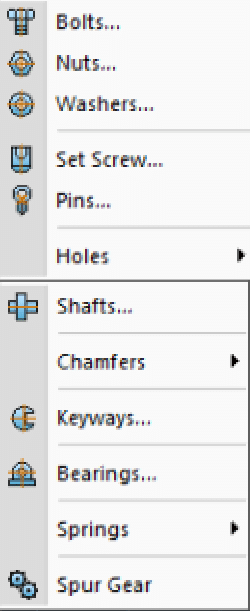
- Select the component
- Choose the size and configuration
- Click to insert
The result is consistent, production-ready mechanical drawings created in a fraction of the time.
“We used to waste hours manually drawing bolts, holes, and fasteners. Mech-Q changed that overnight. Once we switched, fastener detailing became automatic instead of repetitive — and our drawings became more consistent.”
Christoph S. – — CAD Manager
Why Use Mech-Q Mechanical?
Most CAD users don’t realize how much time is lost manually drawing fasteners, holes, shafts, and repetitive mechanical details. Mech-Q Mechanical replaces those steps with automated tools that generate clean, standard CAD geometry — correctly sized, layered, and oriented every time.
Key advantages:
- Near-zero learning curve using dialog-based tools
- Standard CAD entities — no proprietary objects
- 2D and 3D output from the same workflow
- Consistent sizes, layers, and annotations
- Fast drafting without managing block libraries
- Affordable licensing without forced subscriptions
Once you draw fasteners this way, it’s hard to go back to drawing them by hand.
Fasteners & Mechanical Hardware (2D & 3D)
Mech-Q Mechanical includes a powerful fasteners-and-hardware system designed to automate one of the most repetitive tasks in mechanical drafting.
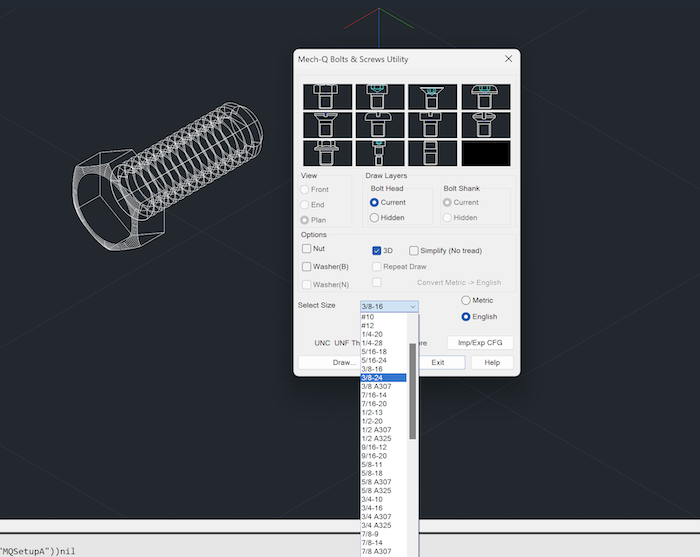
Fasteners are created using dialogs — not blocks — and are inserted by simply selecting two points. Sizes are remembered between placements, making repetitive detailing extremely fast.
Supported Fasteners
Bolts & Screws
- Hex head, socket head, flat head, button head
- Countersunk, pan head, washer head
- Shoulder screws and studs
- Metric and Imperial sizes
Nuts
- Regular hex, thin, washer, lock nuts
- Metric and Imperial
Washers
- Flat washers
- Spring washers
Pins & Set Screws
- Dowel pins, roll pins
- Set screws (cone, cup, flat, half-dog point)
Holes
- Bolt holes matched to fasteners
- Slotted holes
- Drilled holes
All fasteners can be drawn in 2D or 3D, rotated automatically, and placed precisely without rebuilding symbols or searching block libraries.
Fasteners created in Mech-Q Mechanical are designed to work seamlessly with steel members created using the Structural module — making it easy to detail complete steel assemblies using standard CAD .
Designed for Everyday Mechanical Drafting
Mech-Q Mechanical is built for:
- Mechanical engineers
- CAD technicians
- Fabrication and manufacturing drawings
- Maintenance and retrofit documentation
No scripting. No complex setup. No learning curve.
All tools use standard CAD entities, so drawings can be edited, shared, or plotted in any AutoCAD-compatible environment.
Bearings & Bearing Housings
Available as a separate module or within the full Engineering Suite.
Includes:
- Deep groove ball bearings
- Cylindrical roller bearings
- Spherical roller bearings
- Taper roller bearings
- Thrust bearings
- Y bearings
- Pillow blocks & flange housings
All bearings draw with correct views and dimensions.
Shafts, Keys & Chamfers
Auto Shaft Generator
- Draw stepped shafts with chamfers and radii
- Front, end, and sectional views generated automatically
- Internal bores supported
Key & Keyway Utility
- Standard and custom sizes
- Automatic alignment and trimming
Chamfer Tools
- Internal chamfer generator (auto trims geometry)
- External chamfer generator for shaft ends
Gears & Mechanical Components
- Spur gears (Metric & Imperial)
- Accurate tooth geometry
- Front and end views
Material Handling & Conveyor Drafting
Designed for material-handling engineers and industrial layouts.
Conveyor Rolls & Idlers
- Trough, vee, return & flat carry idlers
- End, front & plan views
- Supports common manufacturers
- Suspended idlers supported
Conveyor Chains & Sprockets
- Based on standard chain specifications
- Sprockets with front & end views
- Chain pitch, break load & tooth count supported
Transmission Sprockets
- ISO-based sizing
- Simplex, duplex & triplex
- Steel & cast iron options
Bulk Material Trajectory Generator
- Calculates and draws material flow envelopes
- Ideal for conveyor discharge design
General Mechanical Drafting Tools Included
The Mechanical module also includes productivity utilities for everyday CAD work:
- Global text manipulation
- Text find & replace
- Style conversion
- Text boxing & underlining
- Layer control by selection
- Lock, unlock, freeze & isolate layers
- Batch text scaling
These tools reduce cleanup time and improve drawing consistency.
How Mech-Q Works (Simple Workflow)
- Click a Mechanical tool (e.g., Bolts)
- Choose size and configuration (saved automatically)
- Pick insertion points — done
No block libraries to manage.
No re-scaling.
No redrawing.
Compatible CAD Platforms
Mech-Q Mechanical runs inside:
- AutoCAD®-compatible CAD platforms
- BricsCAD
- IntelliCAD-based CAD systems
- AViCAD (standalone CAD with Mech-Q included)
Drawings remain DWG-native and fully editable.
Part of the Mech-Q Engineering Suite
The Mechanical module is included in the Full Engineering Suite, which also contains:
- Piping
- Structural
- HVAC Ducting
- Mechanical
A Network Module is available for multi-user offices.
Built for Speed, Accuracy & Consistency
Mech-Q Mechanical helps eliminate repetitive drafting tasks while maintaining:
- Standard CAD geometry
- Clean layering
- Consistent sizing
- Fabrication-ready output
It’s mechanical drafting the way it should be—fast, predictable, and easy to maintain.
Try It Risk-Free
Download the 30-day free trial and see how Mech-Q Mechanical simplifies fasteners, shafts, gears, and mechanical detailing—without subscriptions or unnecessary complexity.
See also Mech-Q Network Bundle
View other modules included in the Engineering Suite